IST Clock

Friday, November 12, 2010

ERP … the future

Friends, a post after long time. Here I am again sharing my experiences while working on ERP products. This post can be boring but since this is a theoretical concept so cant help in that.
ERP or Enterprise Resource Planning, as the name suggests is a software package designed and developed to plan all the resources of an enterprise effectively. These resources can be Financial Resources, Human Resources, material resources and others. A ERP package software addresses the enterprise needs of an organization by tightly integrating the various functions of an organization using a process view of the organization. The activities supported by ERP systems include all core functions of an enterprise, including financial management, human resources management, and operations. Major reasons organization going for / advantages of an ERP product are –
- Integration of interrelated information.
- Integration of end to end business processes.
- Standardize and speed up organizational processes.
- Reducing complexity.
- Centralized information source
- Security
Interestingly, above are also the points why organizations are reluctant in installing the ERP system in there facilities as because of these reasons results in decrease of departmental myopia and also the habit of putting work on others shoulders.
We will try to understand all the above points by an example. Visualize an industry process of manufacturing, storing (Inventory) and selling of an item. Now we start from back, a sales person enters a sales order in the system for item X with quantity Q then the inventory in charge should come to know that Q is committed to sales for item X. Further consider that there is minimum stock which is to be maintained for item X and if processing of this sales order decreases the inventory below the minimum stock quantity then the production in charge should be intimated to start production of item X. in turn purchase department should be intimated to purchase the required raw material. Below is a diagram depicting this flow –
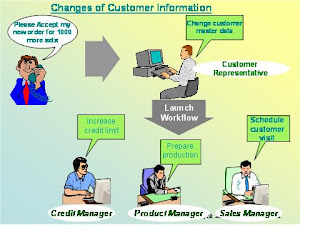
Coming back to above points, ERP automates, integrates this information flow and the business process as well. It also standardizes and reduces the process complexity. Above all, all this information is stored at centralized place and is secured by user privileges.

A quick point on testing ERP software, apart form the normal functionality a tester has to test the business process and the integration of the information among the interrelated modules.

Friday, September 10, 2010

Spice QT-66 Usability Issues

Friends,

Nothing much to write about in this post as this is just a small sharing of information in reference to usability of mobile phones.

Recently, I bought Spice mobile QT-66 just two months back. This is the first time I am using any phone other than Noika. While using spice one, I observed two unusual things both in terms of normal usability and also when compared to Nokia devices. Observations are -

Whenever I disconnect a call without attending it then usually in Nokia devices this goes into RECEIVE CALLS but in my spice device the screen displays MISSED CALL and the entry also goes into the same option (MISSED CALLS)
Second observation is regarding the MESSAGE functionality. Whenever, I reply/type a message and then I opted to end the message screen by pressing the END key then the message gets saved into the OUTBOX folder. Usually it should be in DRAFT folder as per my usage of other devices / messaging software’s

Comments awaited on this…………………

Tuesday, August 17, 2010

ICICI Bank ATM bug … Try it!.............

Friends, apologies as I am updating the blog after a very long gap of almost 2+ months. Anyways, just thought of sharing some interesting observation I found today. (Apologies again as being a tester I would have found this earlier but no body tries to play with their own money so neither did I : ) )
Recently I went onto an ICICI bank ATM for doing some transaction. I noticed one interesting bug over there. I want all of you to try that only once because if you try it for 3 times consecutively your card will be blocked and I am not responsible for that. Anyways, here is what I noticed –
PREREQUISITE - You must have changed your ATM PIN once.
1. Insert the card
2. Enter the old PIN , the one provided by the bank initially
Notice that you will be presented the transaction selection screen

3. Select any transaction, say balance enquiry / any other from the available options
Notice that now you will be prompted that you have entered wrong PIN and the machine will ask for the correct one.
4. Enter the correct PIN and then you will proceed towards the completion of your transaction

Comments awaited on this obsercation as to whether this is a bug OR not . In my opinion , its a high priority Low sivierity BUG

Amit

Wednesday, July 7, 2010

Google Buzzes - minor bug

Recently, I was posting a link on Google Buzz and I noticed one interesting thing that “Add Link” button gets activated with any key event. Normally the buttons of such nature gets activated when user enters any character / text / number in the respective text box but this button in Google Buzz is somewhat different OR I should say a bit deviated from the generally expected / implemented functionality. Here are the steps to reproduce this observation –

Browser – Mozilla Firefox
- Navigate to Google Buzz
- Click on the text area
- Click on LINK hyper link to insert a link / web URL
- Click inside the text box and then press WINDOWS / CTRL + c / CTRL + v / Any other CTRL key combination / Any ALT key combination like ALT + f

Actual Result – The ADD LINK Button gets activated

Thursday, July 1, 2010

Sign Out.. OK... But when did you asked me to Sign In

Bug on Airport Authority of India website

This is first post for July month also I am posting after a gap of almost 15 days. With this post I am sharing some of my finding (BUGS) while surfing the internet.

Recently, I was browsing the website of AIRPORT AUTHORITY OF INDIA and observed two interesting bugs both functionality / usability wise

Bug # 1 – SIGN OUT function (link) available while searching for airports (User is not logged in)

Steps –

- Launch the site http://airportsindia.org.in

- On the left pane menu , click on passenger > airports > all airports

- On the map available, click on any airport for which flight schedules are not uploaded eg. RAIPUR

- Click on ‘Flight Schedules’ link – This step will take user to search flight page (URL - http://airportsindia.org.in/ServletController?action=site_flight_select)

Actual result – Notice the ‘Sign Out’ option available. User has not signed in / not asked to sign in yet. Clicking on this ‘SIGN OUT’ link navigates the user back to the home page. See the screen shot below